

Sampling Raster Data using Polygons with Xarray#
Introduction#
Zonal Statistics analysis extracts a statistical summary of raster pixels within the zones of another dataset. The Xarray ecosystem includes packages such as rioxarray, xvec and xrspatial that can perform very fast statistical operations on geospatial rasters.
These approaches leverage the efficiencies of Xarray and result in performance that is magnitudes faster than other approaches (i.e. with rasterstats). There are a few options for computing zonal statistics:
xvec: Works with the vector geometries directly and offers multiple methods to summarize a raster for each zone.geocube: Rasterizes the geopandas vector data to the Xarray grid, which can then be summarized withxrspatial.
In this tutorial, we will use the xvec package to compute zonal statistics for the vector zones.
Overview of the Task#
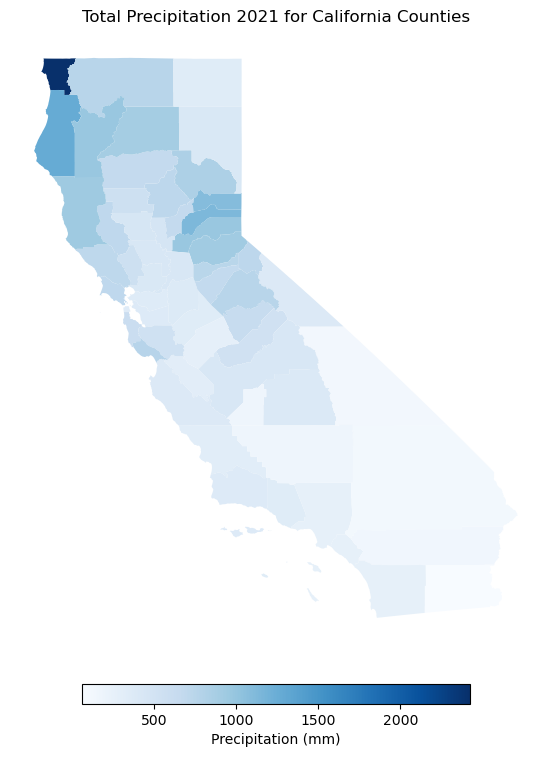
We will use a gridded precipitation raster and extract the mean total precipitaion for each county in the state of California, USA.
Input Layers:
chirps-v2.0.2021.tif: Raster grid of precipitaion for 2021 by Climate Hazards Group InfraRed Precipitation with Station data (CHIRPS) for 2021.cb_2021_us_county_500k.zip: A vector file with polygons representing counties in the US.
Output Layers:
precipitation.gpkg: A GeoPackage containing a vector layer of county polygon with total precipitaion values sampled from the raster.
Data Credit:
CHIRPS 2021 precipitation. Climate Hazards Center (CHC). Retrieved 2022-09
US Census files: 2021 United States Census Bureau. Retrieved 2022-09.
Running the Notebook:
The preferred way to run this notebook is on Google Colab.

Watch Video Walkthrough: Watch a detailed explanation of the workflow. YouTube
Setup and Data Download#
The following blocks of code will install the required packages and download the datasets to your Colab environment.
%%capture
if 'google.colab' in str(get_ipython()):
    !pip install rioxarray xvec exactextract
import os
import pandas as pd
import geopandas as gpd
import rioxarray as rxr
import matplotlib.pyplot as plt
import xvec
data_folder = 'data'
output_folder = 'output'

if not os.path.exists(data_folder):
    os.mkdir(data_folder)
if not os.path.exists(output_folder):
    os.mkdir(output_folder)
def download(url):
    filename = os.path.join(data_folder, os.path.basename(url))
    if not os.path.exists(filename):
        from urllib.request import urlretrieve
        local, _ = urlretrieve(url, filename)
        print('Downloaded ' + local)

raster_file = 'chirps-v2.0.2021.tif'
zones_file = 'cb_2021_us_county_500k.zip'

files = [
    'https://data.chc.ucsb.edu/products/CHIRPS-2.0/global_annual/tifs/' + raster_file,
    'https://www2.census.gov/geo/tiger/GENZ2021/shp/' + zones_file,
]

for file in files:
  download(file)
Data Pre-Processing#
First we will read the Zipped counties shapefile and filter out the counties that are in California state.
The dataframe has a column as STATE_NAME having names of states that can be used to filter the counties for California.
zones_file_path = os.path.join(data_folder, zones_file)

zones_df = gpd.read_file(zones_file_path)
california_df  = zones_df[zones_df['STATE_NAME'] == 'California'].copy()
california_df.explore()
Since the CHIRPS dataset is for whole world, so we clip it to the bounds of California state. Storing the values of bounding box in the required variables.
Now, read the raster file using rioxarray and clip it to the geometry of California state.
raster_filepath = os.path.join(data_folder, raster_file)
raster = rxr.open_rasterio(raster_filepath, chunks=True)
raster
Clip the data to the bounds of the polygons.
bbox = california_df.geometry.total_bounds
clipped = raster.rio.clip_box(*bbox)
clipped
The raster has only 1 band containing yearly precipitaion values, so we select it.
precipitation = clipped.sel(band=1)
precipitation
<xarray.DataArray (y: 191, x: 207)> Size: 158kB
dask.array<getitem, shape=(191, 207), dtype=float32, chunksize=(191, 207), chunktype=numpy.ndarray>
Coordinates:
  * y            (y) float64 2kB 42.02 41.97 41.92 41.87 ... 32.62 32.57 32.52
  * x            (x) float64 2kB -124.4 -124.4 -124.3 ... -114.2 -114.2 -114.1
    band         int64 8B 1
    spatial_ref  int64 8B 0
Attributes:
    TIFFTAG_DOCUMENTNAME:      /home/CHIRPS/annual/v2.0/chirps-v2.0.2021.tif
    TIFFTAG_IMAGEDESCRIPTION:  IDL TIFF file
    TIFFTAG_SOFTWARE:          IDL 8.7.2, Harris Geospatial Solutions, Inc.
    TIFFTAG_DATETIME:          2022:01:18 14:24:32
    TIFFTAG_XRESOLUTION:       100
    TIFFTAG_YRESOLUTION:       100
    TIFFTAG_RESOLUTIONUNIT:    2 (pixels/inch)
    AREA_OR_POINT:             Area
    scale_factor:              1.0
add_offset: 0.0Sampling Raster Values#
Now we will extract the average precipitation for every county in California using xvec.zonal_stats(). Unlike the rasterization-based approach, xvec works with the polygon geometries directly. We use the exactextract method, which weights each pixel by the fraction of its area that falls within the polygon.
First we reproject the county polygons to match the CRS of the raster. When doing Zonal Stats - it is preferred to keep the raster in its original projection to minimize distortions. We reproject the vector layer to match the CRS of the raster.
zones = california_df.to_crs(precipitation.rio.crs)
Next we call zonal_stats() on the raster, passing the county geometries. This returns a DataArray with a geometry dimension holding the mean precipitation for each county.
result = precipitation.xvec.zonal_stats(
    zones.geometry,
    x_coords='x',
    y_coords='y',
    stats='mean',
    method='exactextract',
)
result
<xarray.DataArray (geometry: 58)> Size: 464B
array([ 265.79289135,  338.69792119,  835.59905625, 2422.38481907,
       1269.66081065,  638.109437  ,  263.57814397,  144.37199154,
        473.64605798,  431.94835606,  697.38339139,  529.69273081,
        343.66473792,  611.02821661,  699.42914094,  325.10174308,
        717.36000133,  561.47937485,  416.41740037,  371.51925182,
        973.06104356,  565.17097124, 1132.55269448,  312.16000508,
        374.98678173,  358.23446007,  660.97382467,  895.97459491,
        394.99928553,  116.50823766,  708.88417128,   58.53158784,
        126.07940938,  388.78854853,  755.67199283,  920.11211316,
        717.37465478,  277.23219875,  749.4714781 ,  674.53471643,
        542.28555916,  763.19453207,  366.05509917,  383.9889113 ,
        261.6799609 ,  975.44807094,  430.32097326,  455.10289561,
        939.01116085,  162.56074183,  342.9050565 ,  169.41882617,
        347.19875041,  429.68675062,  410.47765103,  664.19366417,
        756.48204389, 1091.59317489])
Coordinates:
  * geometry  (geometry) geometry 464B POLYGON ((-118.11442090338669 33.74517...
    index     (geometry) int64 464B 47 50 94 181 245 ... 2573 2728 2984 3099
Indexes:
    geometry  GeometryIndex (crs=EPSG:4326)
Attributes:
    TIFFTAG_DOCUMENTNAME:      /home/CHIRPS/annual/v2.0/chirps-v2.0.2021.tif
    TIFFTAG_IMAGEDESCRIPTION:  IDL TIFF file
    TIFFTAG_SOFTWARE:          IDL 8.7.2, Harris Geospatial Solutions, Inc.
    TIFFTAG_DATETIME:          2022:01:18 14:24:32
    TIFFTAG_XRESOLUTION:       100
    TIFFTAG_YRESOLUTION:       100
    TIFFTAG_RESOLUTIONUNIT:    2 (pixels/inch)
    AREA_OR_POINT:             Area
    scale_factor:              1.0
add_offset: 0.0At this point we only have the geometries from the original vector data. It will be useful to add some attributes from the original GeoDataFrame. As we have an XArray vector data cube, this is done by adding it as a coordinate variable. The cell below adds the NAME attribute with the county name.
result['NAME'] = ('geometry', zones['NAME'].values)
result = result.assign_coords({'NAME': result['NAME']})
result
<xarray.DataArray (geometry: 58)> Size: 464B
array([ 265.79289135,  338.69792119,  835.59905625, 2422.38481907,
       1269.66081065,  638.109437  ,  263.57814397,  144.37199154,
        473.64605798,  431.94835606,  697.38339139,  529.69273081,
        343.66473792,  611.02821661,  699.42914094,  325.10174308,
        717.36000133,  561.47937485,  416.41740037,  371.51925182,
        973.06104356,  565.17097124, 1132.55269448,  312.16000508,
        374.98678173,  358.23446007,  660.97382467,  895.97459491,
        394.99928553,  116.50823766,  708.88417128,   58.53158784,
        126.07940938,  388.78854853,  755.67199283,  920.11211316,
        717.37465478,  277.23219875,  749.4714781 ,  674.53471643,
        542.28555916,  763.19453207,  366.05509917,  383.9889113 ,
        261.6799609 ,  975.44807094,  430.32097326,  455.10289561,
        939.01116085,  162.56074183,  342.9050565 ,  169.41882617,
        347.19875041,  429.68675062,  410.47765103,  664.19366417,
        756.48204389, 1091.59317489])
Coordinates:
* geometry (geometry) geometry 464B POLYGON ((-118.11442090338669 33.74517...
index (geometry) int64 464B 47 50 94 181 245 ... 2573 2728 2984 3099
NAME (geometry) str 905B ...
Indexes:
geometry GeometryIndex (crs=EPSG:4326)
Attributes:
TIFFTAG_DOCUMENTNAME: /home/CHIRPS/annual/v2.0/chirps-v2.0.2021.tif
TIFFTAG_IMAGEDESCRIPTION: IDL TIFF file
TIFFTAG_SOFTWARE: IDL 8.7.2, Harris Geospatial Solutions, Inc.
TIFFTAG_DATETIME: 2022:01:18 14:24:32
TIFFTAG_XRESOLUTION: 100
TIFFTAG_YRESOLUTION: 100
TIFFTAG_RESOLUTIONUNIT: 2 (pixels/inch)
AREA_OR_POINT: Area
scale_factor: 1.0
add_offset: 0.0The result has one value per county, in the same order as the input polygons. We add it back to the county layer as a new mean column.
result_gdf = result.xvec.to_geodataframe(
    name='precipitation_mean', geometry='geometry')
result_gdf.head()
| geometry | index | NAME | precipitation_mean | |
|---|---|---|---|---|
| 0 | POLYGON ((-118.11442 33.74518, -118.11305 33.7... | 47 | Orange | 265.792891 |
| 1 | MULTIPOLYGON (((-119.44123 34.01407, -119.4366... | 50 | Ventura | 338.697921 |
| 2 | POLYGON ((-121.49703 40.43702, -121.49487 40.4... | 94 | Plumas | 835.599056 |
| 3 | MULTIPOLYGON (((-124.21749 41.95081, -124.2170... | 181 | Del Norte | 2422.384819 |
| 4 | POLYGON ((-124.4086 40.44321, -124.39664 40.46... | 245 | Humboldt | 1269.660811 |
Let’s plot and visualize the results. The map shows the average annual precipitation for each county in California.
fig, ax = plt.subplots(1, 1)
fig.set_size_inches(10,10)

legend_kwds={
           'orientation': 'horizontal',  # Make the legend horizontal
           'shrink': 0.5,  # Reduce the size of the legend bar by 50%
           'pad': 0.05,  # Add some padding around the legend
           'label': 'Precipitation (mm)',  # Set the legend label (optional)
       }
result_gdf.plot(ax=ax, column='precipitation_mean', cmap='Blues',
          legend=True, legend_kwds=legend_kwds)
ax.set_axis_off()
ax.set_title('Total Precipitation 2021 for California Counties')
plt.show()
Finally, we save the sampled result to disk as .gpkg.
output_file = 'precipitation_by_county.gpkg'
output_path = os.path.join(output_folder, output_file)

result_gdf.to_file(driver = 'GPKG', filename =output_path)
print('Successfully written output file at {}'.format(output_path))
If you want to give feedback or share your experience with this tutorial, please comment below. (requires GitHub account)